What is an AI Agent?
Introduction
Large Language Models (LLMs) have made chatbots feel smarter than ever. You can ask questions, generate summaries, write code, and get explanations instantly. But as soon as you try to turn an LLM into something that can actually do work in the real world, you quickly realize that plain chat completion is not enough.
This is where AI agents come in.
AI agents are not just “LLMs with memory” or “LLMs with better prompts”. A real AI agent is an architecture: a loop-based system that can plan tasks, call tools, observe results, and decide what to do next.
In this post, we will break down what an AI agent really is, how it works internally, and what a realistic LLM agent architecture looks like in production. We will also explain a popular agent architecture diagram from PromptingGuide, which is one of the clearest representations of how modern tool-using agents operate.
What is an AI Agent?
An AI agent is a system that uses an LLM as its reasoning engine, but is capable of taking actions through external tools in order to complete a goal.
A chatbot generates responses. An agent generates outcomes.
Instead of answering a single question and stopping, an agent can do multi-step reasoning and continue working until the task is finished. This usually involves calling APIs, querying databases, retrieving documents, or running code.
A practical definition is:
An AI agent is an LLM-driven loop that can plan, act, observe, and repeat until it completes a task.
The most important word here is loop. If your system only responds once, it is not really an agent.
Chatbot vs AI Agent (The Real Difference)
A normal LLM chatbot behaves like this:
- User asks a question.
- Model generates an answer.
- End.
An AI agent behaves differently:
- User gives a task or objective.
- Agent breaks the task into steps.
- Agent chooses which tool to call.
- Agent runs the tool.
- Agent reads the tool output.
- Agent decides the next action.
- Repeat until the objective is achieved.
This is why agents are powerful, but also why they are harder to deploy. They require orchestration, tool integration, and control logic around the model.
Why LLMs Alone Are Not Enough
LLMs are great at language generation, but they have major limitations when used as standalone systems:
- They cannot access real-time information reliably.
- They cannot query your database directly.
- They cannot execute code safely on their own.
- They cannot take real-world actions like sending emails or booking tickets.
- They hallucinate facts when the answer is not in context.
If you want your system to do anything beyond conversation, you need a way to connect the LLM to external tools and trusted sources of truth. That connection layer is what transforms a chatbot into an agent.
The Core Components of an LLM Agent System
Most AI agent architectures, regardless of framework, include the same components.
1. The LLM (Reasoning Engine)
The LLM is responsible for interpreting the user’s goal and deciding what to do next. However, the LLM should not be treated as the system itself. In production, it is only one part of the pipeline.
2. Tools (Action Interface)
Tools are external functions or services that the agent can call.
Examples include:
- Web search
- SQL database query
- Vector database retrieval
- OCR extraction
- Calendar scheduling
- Payment processing
- File reading and writing
- API requests
Tools are what make the agent capable of real-world execution.
3. Memory (State Persistence)
Memory is what allows an agent to remember useful information beyond the immediate chat history.
This is usually implemented as external storage such as:
- SQL databases for structured memory (profiles, logs, transactions)
- Vector databases for semantic memory (unstructured text, documents, conversation history)
- Object storage for files (PDFs, images, transcripts)
Without memory, an agent becomes inconsistent over time and cannot support long-term workflows.
4. Planner (Task Decomposition)
The planner breaks a high-level goal into smaller steps.
For example, if the user says:
Summarize my meeting notes and email them to my manager.
The planner might generate steps like:
- Read the meeting notes.
- Extract key points and decisions.
- Write a structured summary.
- Draft an email.
- Ask user for approval.
- Send the email.
Planning is what gives the agent structure. Without it, the agent tends to produce incomplete answers or rush to conclusions.
5. Executor (Tool Calling and Workflow Execution)
The executor is the component that actually runs tool calls. This is important because in production systems, the LLM should not have direct control over execution. The LLM outputs a tool request, but the backend system executes it.
This separation improves reliability and safety.
6. Verifier / Critic (Quality Control)
Many production agents use a verification step to reduce hallucination. A verifier checks whether:
- The tool output matches the final response.
- The agent’s reasoning is consistent.
- The agent is making unsafe assumptions.
- The final answer includes fabricated information.
This is especially important in domains like finance, healthcare, or compliance workflows.
Understanding the Agent Architecture Diagram
The architecture image below from PromptingGuide is one of the best diagrams to explain how an LLM agent actually works. The key idea is that an agent is not a single model call. It is a loop-based architecture.
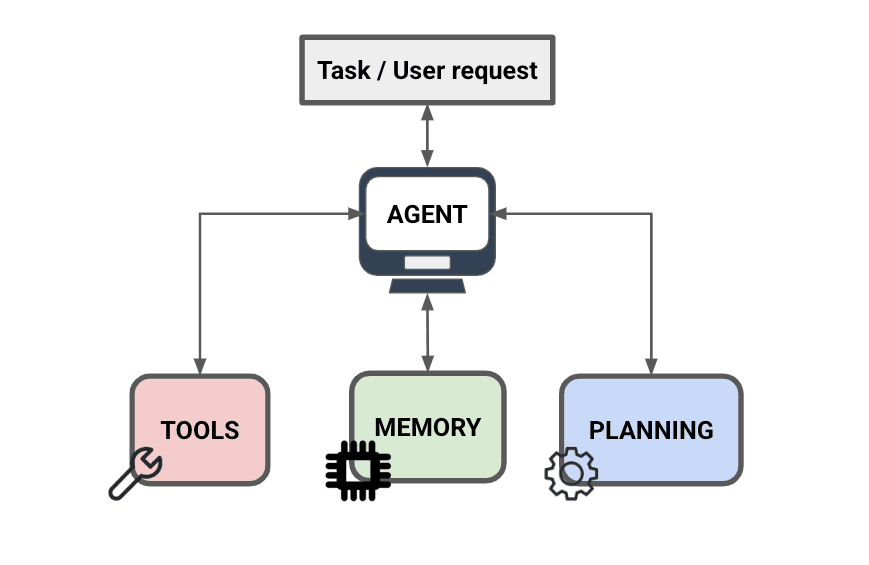
AI agent architecture showing the reasoning, action, and observation loop.
Step-by-Step Explanation of the Architecture
Step 1: The User Sends a Goal
Agents are usually goal-driven. Instead of asking a simple factual question, the user provides an objective. For example:
Plan a 3-day Tokyo itinerary with food recommendations and estimated costs.
This is not a simple Q&A problem. It requires planning, retrieval, and synthesis.
Step 2: The Agent Enters the Reasoning Loop
The diagram shows the agent performing reasoning. This is the stage where the agent decides:
- What is the user’s goal?
- What information is missing?
- What tools should I use?
- What is the next best step?
At this stage, the agent is not answering the user yet. It is deciding what to do.
Step 3: The Agent Calls Tools
The next part of the diagram shows the agent interacting with tools. This is the most important difference between an agent and a chatbot.
For example, if the user asks:
What are the cheapest flights to Tokyo next week?
A chatbot might hallucinate prices. An agent would call a tool like:
search_flights(origin="KUL", destination="HND", date_range="next week")Tool calls provide real data, not generated guesses. This is where function calling becomes extremely useful, because the agent can generate structured tool requests instead of vague instructions.
Step 4: Observation (Tool Results Are Fed Back Into the Agent)
After a tool runs, the system returns the result to the agent. This is the “observation” stage. The agent reads the tool output and updates its reasoning.
At this point the agent may decide:
- Is this enough information?
- Do I need another tool call?
- Should I ask the user for clarification?
- Do I have conflicting results that need verification?
This observe-and-decide loop is what makes agents iterative.
Step 5: Memory and Knowledge Storage
The diagram also shows memory as a separate component. This is critical because agent systems cannot rely on chat history alone.
In production, memory is usually split into:
- Short-term memory: recent chat history and working context.
- Long-term memory: stored externally, retrieved when needed.
Long-term memory is often implemented using vector databases, because they allow semantic recall. For example, an agent can remember:
- You prefer halal food.
- You avoid seafood.
- You are tracking calories.
- You previously asked for Tokyo budget planning.
Without memory, agents reset after each session, which makes them feel unreliable and unusable.
Step 6: The Agent Produces a Final Answer
Once the agent decides it has enough information, it generates a final response for the user. The key point is that the final response should be based on evidence collected through tools and memory, not purely generated text.
This is what reduces hallucination and increases reliability.
Why Agents Are Expensive (Cost and Token Usage)
One of the first things engineers notice is that agents cost significantly more than chatbots.
A chatbot is usually one model call. An agent can involve:
- A planning call
- A tool selection call
- A retrieval call
- A reasoning call after tool observation
- A final response call
In many cases, a single user request can trigger multiple LLM calls. This increases token usage and creates unpredictable inference costs, especially when tool outputs are large.
This is why production agent systems require strong cost controls.
Why Agents Are Slow (Latency Bottlenecks)
Agents also introduce latency. Even if each model call takes only a few seconds, an agent doing multiple steps can easily take 10 to 20 seconds.
Latency increases because:
- Tool calls take time.
- Database queries take time.
- Retrieval pipelines add overhead.
- The LLM repeatedly reprocesses context windows.
This is why many real products simplify agent behavior and reduce tool loops unless necessary.
Why Agents Fail in Production (Reliability Issues)
Agents are powerful, but they fail in predictable ways. Common production failures include:
- Tool hallucination: the model assumes tool results without actually calling them.
- Wrong tool choice: the agent uses search when it should query a database.
- Infinite loops: repeated tool calls without reaching a stopping condition.
- Overconfidence: confident responses with missing evidence.
- Context pollution: irrelevant tool outputs fill the context window.
This is why production agents require guardrails and strict orchestration logic.
Guardrails: What Makes an Agent Production-Ready
A production agent needs constraints. Common guardrails include:
- Maximum tool calls per request.
- Timeout limits for tool execution.
- Validation of tool inputs and tool schemas.
- Output verification rules.
- Refusal behavior when confidence is low.
- User approval for sensitive actions.
For example, an agent should never send an email, place an order, or trigger payments without user confirmation.
Single Agent vs Multi-Agent Systems
Many people assume AI agents always mean multi-agent systems. That is not true.
Single Agent System
A single LLM controls planning, tool use, and final output. This is simpler and usually the best starting point.
Multi-Agent System
Multiple specialized agents collaborate. For example:
- Research agent
- Planning agent
- Execution agent
- Verification agent
Multi-agent systems can improve quality, but increase complexity, latency, and cost. Most production teams start with a single agent and only move to multi-agent systems when they have clear bottlenecks.
Where AI Agents Actually Make Sense
Not every application needs an agent. Agents are most valuable when tasks require:
- Multiple steps
- External tool calls
- Retrieval and memory
- Repeated workflows
- Decision-making logic
Examples of strong agent use cases include:
- Customer support automation with escalation workflows
- Report generation and analytics
- Resume screening and hiring automation
- Knowledge base assistants with document retrieval
- Code review and debugging assistants
- Personal productivity assistants
If your product is simple Q&A, a chatbot is usually enough. If your product needs execution and automation, agents become useful.
Conclusion
An AI agent is not just an LLM answering questions. It is an architecture built around the LLM. A real agent system includes planning, tool execution, memory retrieval, observation loops, and guardrails.
The PromptingGuide architecture diagram captures the key idea clearly: agents operate as a loop. They reason, act, observe, and repeat until the goal is completed.
The biggest takeaway is that agent performance depends more on system design than model size. A well-designed pipeline with good tool integration and memory can outperform a larger model running as a basic chatbot.
As LLM agents become more common, the teams that succeed will be the ones who treat agents like software systems, not just prompts.
Key Takeaways
- An AI agent is a loop-based system, not a single response generator.
- Agents combine LLM reasoning with tools, memory, and execution logic.
- Tool calling is what allows agents to interact with real-world systems.
- Memory is external in production, often using SQL and vector databases.
- Agents are slower and more expensive than chatbots due to multi-step workflows.
- Guardrails are required to prevent hallucination, looping, and unsafe actions.
- A strong architecture matters more than choosing the biggest model.